
Wall mounting a TV and soundbar together: height, spacing and cables
Picture and sound, perfectly aligned
Published on: 2 November 2026
Short answer: hang the TV first, put the soundbar below it with a gap of roughly 5 to 10 cm, and keep the front of the soundbar clear of the screen. The easiest way to get that right is a soundbar bracket such as the SOUND 3550. It hangs the bar from your TV bracket, so it sits at the right height directly under the screen without any measuring or extra drilling. And if your TV is on a full motion bracket, the soundbar turns with it. Here is how to get all of it right the first time.
Start with the TV, not the soundbar
The soundbar goes where the TV allows, so the TV position comes first. The rule is unchanged: the centre of the screen sits at eye level when you are seated, which for most living rooms means the middle of the screen somewhere between 100 and 120 cm from the floor. We cover this in detail, including figures per screen size, in our guide to the ideal height for your TV.
One planning point specific to this setup: allow for the soundbar before you drill. A soundbar plus its clearance needs roughly 15 to 20 cm of wall below the screen. If you place the TV at its lowest comfortable height and only then think about the soundbar, the bar ends up squeezed against the media unit. With a soundbar bracket on the TV bracket, you only need to keep that space clear. There is no second set of holes to plan, because the bar hangs from the TV rather than from the wall.
How far below the TV should a soundbar be?
Aim for a gap of about 5 to 10 cm between the bottom edge of the screen and the top of the soundbar.
The easy way: let the bracket set the height. With the SOUND 3550 you do not measure from the floor or drill a second set of holes for the soundbar. It attaches to your TV bracket and hangs directly under the screen. Its height is adjustable, so you can set exactly the gap you want, and it is easy to level. The figures below still apply, but the bracket does most of the work for you.
Too close and three things go wrong. The soundbar can clip the bottom edge of the panel when you tilt the TV. It can block the TV’s infrared receiver, which usually sits in the lower centre of the bezel, so your remote stops working reliably. And the two surfaces sitting flush can produce audible resonance at higher volumes.
Too far apart and the sound visibly separates from the picture, which is most noticeable with dialogue. A gap much beyond 25 cm starts to feel wrong even if you cannot say why.
One exception worth knowing: soundbars with upward-firing drivers for three-dimensional audio need more room, because the sound has to leave the top of the bar and bounce off the ceiling. For those, leave at least 10 cm of clearance rather than 5.
Height above the floor matters less than people expect. A soundbar is a wide, forgiving source, and there is no need to get it to ear level the way you would with a standalone speaker. Anywhere between the media unit and just below the screen works.

Below, in almost every case. That is where your ears expect the sound to come from, it is where the connections are shortest, and it is the position every soundbar is voiced for at the factory.
Above the screen only makes sense in two situations: when the TV sits very low, for example on a floor stand in a small room, or when a fireplace or a radiator leaves no usable wall underneath. If you do mount a bar above the screen, angle it down towards the seating position. Be aware that a bar with upward-firing drivers loses most of its effect there, since those drivers are aimed at the ceiling from an already high starting point.
Behind or inside furniture is the arrangement to avoid. A closed cabinet muffles the mid range and blocks the remote sensor on the bar itself.
Three ways to position the soundbar
On the media unit
The quickest route, with no drilling. Make sure the bar sits far enough forward that the unit does not muffle it, and check that it does not cover the TV’s sensor if your TV sits low.
On the wall, separately
A cleaner look and precise control over the gap. It is the better option if your TV sits high, above a fireplace for example, where a soundbar left on the unit would be a long way from the screen.
On the TV bracket itself: the easiest option
This is the option most people do not know exists, and it is the one that solves the full motion problem. A soundbar bracket attaches the bar to your TV bracket rather than to the wall, so the two stay locked in position relative to each other. The soundbar hangs at the right height under the screen without any measuring. The height is adjustable, so you can fine tune the gap and line the bar up exactly, and when the TV turns, the soundbar turns with it. It is built for use with a full motion TV bracket, so check what type of mount your TV is on before you order.
Two more things to check:
- the weight of your soundbar against the bracket’s maximum,
- and whether your model is covered.
The SOUND 3550 carries up to 6.5 kg and fits most soundbar shapes, including bars that mount by their own screw holes on the underside.
If your TV is on a full motion bracket
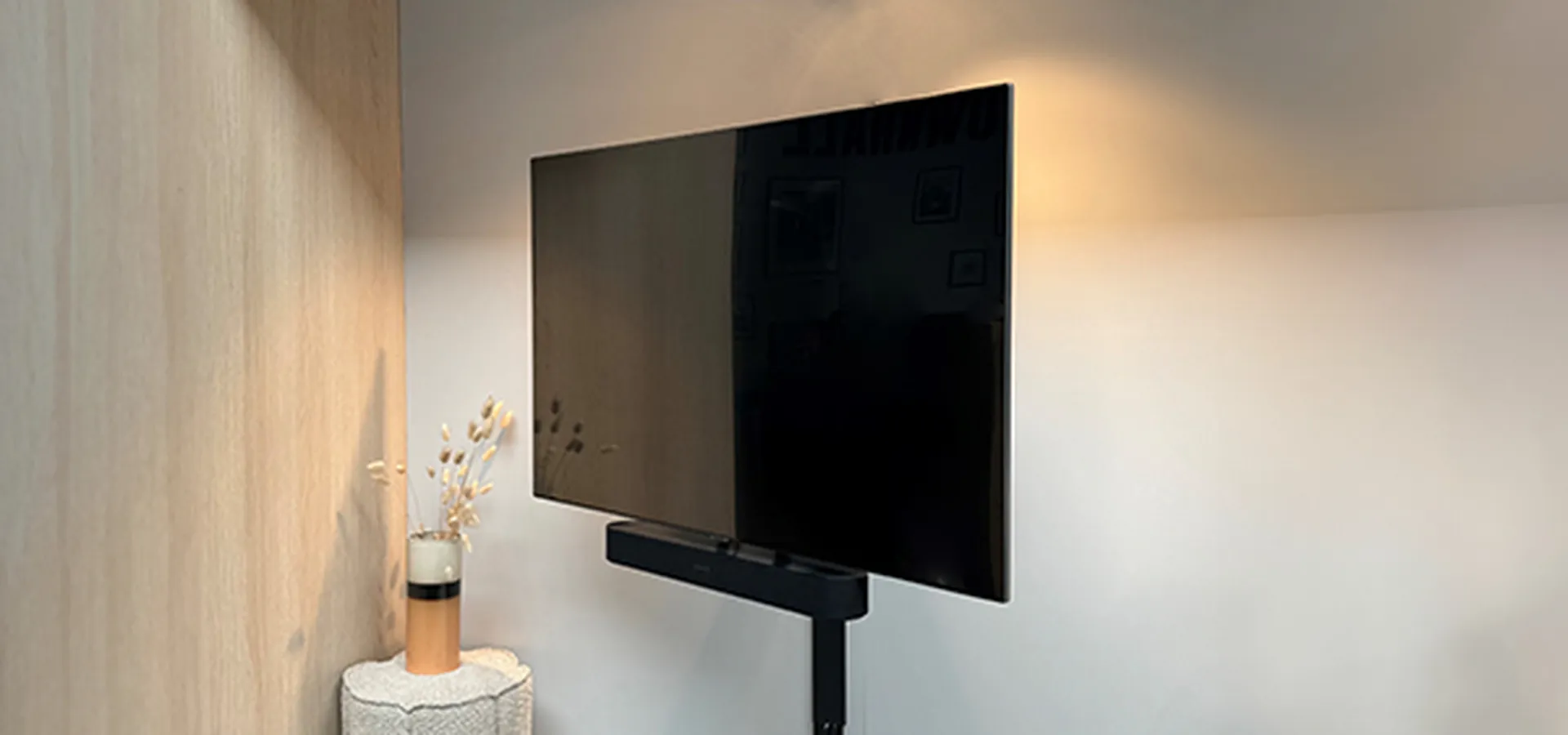
This is the combination most people get wrong. The TV swivels and a soundbar sitting on the media unit does not, so every time you angle the screen towards the dining table, the sound keeps pointing at the empty sofa. Fixing the bar to the bracket is the clean answer, since the sound then follows the picture wherever you turn it. If you would rather keep the soundbar separate, leave enough clearance for the bottom edge of the screen to pass over it through the full movement. Test the complete rotation before the fixings go in permanently.
Cables need the same thought. Use a longer HDMI cable than you think you need, so the bracket can reach its full rotation angle without pulling the connection tight. Many of our full motion brackets route cables through the arms with the Cable Inlay System, which keeps them hidden as the TV turns.
Cables for two devices
A TV and soundbar setup means at least four cables in the same wall space: mains for the TV, mains for the soundbar, HDMI between them, and usually an aerial or network cable.
Three things make it manageable. Put the sockets behind the TV rather than beside the unit, if you have the option. Group the cables into a single run rather than letting them fan out. And use a cover sized for all of them: the universal aluminium cable cover holds up to six cables and can be painted to match the wall. Our cable management guide covers in-wall and no-drill alternatives.
Adding rear speakers to a soundbar
If you are building out from the soundbar into surround sound, the placement rules change, because separate speakers are directional in a way a soundbar is not.
- Place rear speakers at or slightly above ear height when seated, so around 110 to 130 cm, and angle them towards the seating position.
- Keep the two rears between two and four metres apart.
- Give them room to breathe rather than pushing them into a corner, since a corner exaggerates the bass.
- Check the manufacturer’s clearance advice. For example, Sonos recommends about 60 cm of free space above a wall-mounted Era speaker.
A speaker wall mount gets them to the right height and angle without furniture in the way, and a floor stand does the same job without drilling. There are dedicated mounts for Sonos and for Bowers & Wilkins, and a surround speaker mount for smaller satellites.
Getting it right for winter viewing
Dark evenings change what you notice. Lamps and ceiling lights that were invisible in daylight suddenly reflect off the screen, and high contrast panels show it most. If your viewing has moved to the evening, a bracket that swivels is worth more than one that tilts, because you can angle the picture away from the light source rather than rearranging the room. And if the screen moves, the sound should move with it.
Frequently Asked Questions TV Brackets
Around 5 to 10 cm between the bottom edge of the screen and the top of the soundbar. Leave at least 10 cm if your soundbar has upward-firing drivers for three-dimensional audio, so the sound can reach the ceiling. With a soundbar bracket such as the SOUND 3550, you set the gap on the bracket itself, so there is nothing to measure on the wall.
Yes. A soundbar bracket fixes the bar to the TV bracket instead of the wall, so it hangs at the right height under the screen without any measuring, and it turns with the screen. It is designed to be combined with a full motion TV bracket, so check the type of mount you have. Also check your soundbar’s weight against the bracket’s maximum load.
Below, in almost every case. Above only makes sense when the TV sits very low, or when there is no usable wall underneath it.
Yes. The infrared receiver is usually in the lower centre of the bezel, so a soundbar placed tight against the screen can sit directly in front of it. Keeping the gap at 5 cm or more usually solves it.
Keep the centre of the screen at seated eye level and plan 15 to 20 cm of clear wall below it for the soundbar. If that pushes the screen uncomfortably high, put the soundbar on the media unit instead.
Sign up for our newsletter
Be the first to receive discounts and promotions? Sign up for our newsletter.


- Copyright
- Privacy policy
- Disclaimer
- Cookies
- Webshop conditions
- Complaints & Disputes
- Colophon
- © Vogel's Products BV 2026